
7A Game Android APK Download and Details

Description
7A Game is a mobile gaming platform that offers different types of games in one place. Additionally, it is mainly discussed as an Android-based gaming app for users who want to explore various game options. However, the available features can depend on the version and platform.
The app may include different gaming categories, simple navigation, and account-based features for users. Some versions may also provide options related to deposits, withdrawals, bonuses, or other platform services. However, these features can change over time.

Before using 7A, users should check the latest app information and download it from a reliable source. They should also review the available terms, payment details, and local rules before using any money-related feature. Game results are not guaranteed, so users should play responsibly.
What Is 7A Game?
7A Game is a mobile gaming platform that gives users access to various games through an Android application or APK. It is generally explored by people who want to find different gaming choices within a single platform. The available games and features may vary according to the app version.
The platform can offer account creation, different game categories, promotional options, and payment-related services. However, users should always check the latest version before using these options because features, services, and availability may change over time.
7A should be approached with care and responsible use. Before installing or using the application, users should verify the download source, requested permissions, terms, and payment details. Money-related gaming may involve financial risk, and no particular result or return is guaranteed.
Entertainment Game Categories
Card Games
Generally, card games offer simple gameplay based on cards and different rules. However, the available card options may vary according to the 7A Game version.
Casino-Style Games
Similarly, casino-style games may include digital versions of different table-based games. However, their names, features, and availability can change with each app version.
Arcade Games
Additionally, arcade games usually provide quick and simple gameplay for entertainment. Therefore, they may appeal to users who prefer shorter gaming sessions. However, the available arcade choices may depend on the current platform version.
Puzzle Games
Meanwhile, puzzle games focus on solving tasks, matching items, or completing challenges. In addition, they can offer engaging activities for users who enjoy problem-solving and simple gameplay.
Sports Games
Furthermore, sports games are based on different sporting themes and activities. However, the available sports options may vary depending on the 7A Game version.
Crash-Style Games
In addition, crash-style games may use a changing multiplier as part of their gameplay. However, results can be unpredictable, so users should understand the rules and potential risks before playing.
Table Games
Similarly, table games are digital versions of different games commonly played on tables. Their rules, features, and availability may differ between app versions. Therefore, users should check the current game information before proceeding.
Casual Games
Finally, casual games usually have simple controls and easy-to-understand gameplay. As a result, they can provide short entertainment sessions for users who prefer straightforward game options. Moreover, for more games of this type, visit 888PKR Game.
How to Download and Install 7A Game APK?
- Open a trusted website that provides the 7A APK.
- Check the APK name and version before downloading.
- Tap the Download button to start the download.
- Wait until the APK file is fully downloaded.
- Open the downloaded file from your phone’s Downloads folder.
- Follow the instructions shown on the screen.
- Check the app permissions before completing installation.
- After installation, open 7A and check that it works properly.
- Avoid APK files from unknown or suspicious websites.
- Keep your Android device and security updates up to date.
7A Game Registration and Login Guide
Step For Register
- Open the 7A app or official website.
- Click on the Register button.
- Enter your required details.
- Add your mobile number if needed.
- Create a password for your account.
- Complete the verification step if shown.
- Check your information and submit the form.
Steps For Login
- Open the 7A Game app or website.
- Select the Login option.
- Enter your registered mobile number or username.
- Enter your account password.
- Check the entered details carefully.
- Click the Login button.
- Your account should open if the details are correct.
How to Add Funds and Withdraw Earnings?
Follow the steps for Adding Funds
- Open your 7A Game account and go to the payment section.
- Select the Deposit or Add Funds option.
- Choose an available payment method.
- Enter the amount you want to add.
- Check the payment details shown on the screen.
- Complete the payment through your selected method.
- Wait for the balance to update in your account.
- If the balance does not update, check the transaction status.
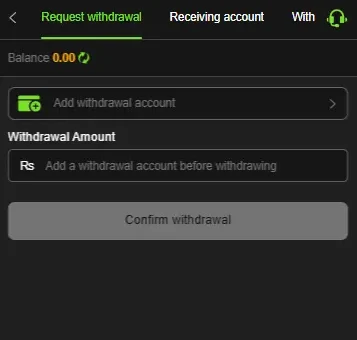
How to Withdraw Earnings?
- Log in to your 7A Game account.
- Open the Withdraw or Payment section.
- Select an available withdrawal method.
- Enter the amount you want to withdraw.
- Add or select your required payment details.
- Check the withdrawal information carefully.
- Submit the withdrawal request.
- Wait for the platform to process the request.
- Processing time and available methods may vary by account or app version.
Main Highlights
Multiple Game Choices
7A Game may bring different gaming options together in one application. However, the types of games available can depend on the current version.
Easy App Layout
Additionally, the application may use a simple layout with clear sections and menus. As a result, this can help users move between different parts of the platform more easily.
Android APK Support
7A may be offered in APK format for Android phones. Users should check the file source and version before installing the application.
User Account
The platform may allow users to create a personal account. The information needed during registration can vary according to the current app version.
Quick Login
Registered users may access their accounts through the login section. The required login details can depend on how the account was created.
Payment Features
Some versions may include options for adding funds and requesting withdrawals. Payment methods, limits, and processing rules may change over time.
Bonus Section
Certain versions may show promotional deals or bonus options. Users should read the related conditions carefully before using any offer.
Mobile Access
7A is designed around mobile use and may work on compatible Android devices. Performance can depend on the phone, internet connection, and installed app version.
Tips for Better Gameplay
- Start with games you already understand.
- Read the rules before playing.
- Learn how each game works before using money.
- Begin with a small amount if a paid feature is involved.
- Set a personal spending limit and follow it.
- Take regular breaks during longer sessions.
- Do not chase losses by increasing your spending.
- Keep your account details private.
- Use a stable internet connection for smoother gameplay.
- Remember that game results can be unpredictable.
Safety Tips
- Download the 7A APK only from a source you can verify.
- Check the APK version before installing it on your phone.
- Review the app permissions and avoid unnecessary access.
- Keep your Android system updated with the latest security updates.
- Use a strong password for your 7A Game account.
- Never share your password, OTP, or account details with anyone.
- Check payment information carefully before making a transaction.
- Avoid clicking on unknown links or suspicious pop-ups.
- Do not use unofficial or modified versions of the app.
- Set a personal limit if money-related features are available.
- Check the platform rules before making deposits or withdrawals.
- Stop using the app if you notice unusual account activity.
Advantages and Disadvantages
Advantages
- Offers different game choices on one platform.
- Provides a simple mobile-friendly interface.
- May include several account features for users.
- Can be accessed through an Android APK.
- Some versions may offer different promotional options.
- Users may find multiple gaming categories in one place.
Disadvantages
- Features can change between different app versions.
- The APK may not be available through the Google Play Store.
- Some features may require account registration.
- Payment options can vary by version or region.
- Money-related gaming can involve financial risk.
- Game results are not guaranteed and may be unpredictable.
Common 7A Game Problems and Solutions
| Problem | Simple Solution |
|---|---|
| APK Does Not Install | Check the APK version and make sure your phone has enough free space. |
| Game Loads Slowly | Check your internet connection and restart the app. |
| App Closes Suddenly | Update the app and restart your Android device. |
| Login Is Not Working | Recheck your account details and use the password recovery option if available. |
| Balance Is Not Updated | Check the transaction status and contact the platform support team if needed. |
| Download Is Not Starting | Check your internet connection and try the download again from a verified source. |
Questions That Have Always Been Asked by Users (FAQS)
7A Game is a mobile gaming platform that may provide different games and user features. Its options can vary by version.
Visit a verified source, find the required APK file, and tap the download option. Check the file before installing it.
Open the registration page, enter the required information, and complete any verification step shown on the screen.
Use the payment section to add funds or request a withdrawal. Available methods and processing rules may vary by version.
Final Words
7A Game is a mobile gaming platform that may offer different games and useful account features. However, the available options can change with new app versions.
Before using the platform, check the APK source, app details, payment information, and account rules carefully. Additionally, keep your personal and login details private.
Gaming results can be uncertain, especially when money is involved. Therefore, use the platform responsibly, follow the applicable rules, and avoid spending more than you can afford.