
B77 Game APK Complete Guide For Android Users

Description
Mobile gaming apps have gained massive popularity among smartphone users across Pakistan. Moreover, people often look for digital entertainment options that run smoothly on standard Android devices and offer diverse interactive features. Among various applications discussed in online forums, the B77 Game also attracts attention from users interested in mobile gaming platforms. Therefore, this article provides a comprehensive, informative look at what the B777 Game involves, how Android APK files function, and what users should keep in mind regarding safety and performance.

What Is B77 Game?
The B77 Game is a mobile-oriented application designed to host various digital entertainment options within a single interface. Primarily, it is built for Android smartphones and tablets, offering a unified dashboard where users can explore different game categories, view active options, and manage their profile settings. Moreover, if you are interested in exploring similar games, you can also visit 666PK Game for more guides.
Additionally, the application focuses on lightweight performance to help it run on a wide range of mobile devices commonly used in Pakistan. Instead of requiring multiple separate apps for different card styles or arcade challenges, the platform brings these features together in one central location. However, exact availability, layout designs, and active features may vary depending on the specific version and software updates released over time.
Main Features of B77 Game
Unified Digital Dashboard
The application brings together multiple gaming categories under one clean dashboard layout. Moreover, users can switch between different sections without needing to navigate away from the main application environment.
Mobile-First Design
The platform is optimized specifically for Android devices. Therefore, it aims to provide stable performance even on standard smartphones with moderate RAM and processor specifications.
Account Management System
Additionally, the software includes built-in profile controls that allow users to register an account, set secure passwords, and access personal settings directly from their mobile screen.
Lightweight Package Size
The installation package is generally structured to consume minimal storage space. As a result, it may be convenient for devices with limited internal memory. However, the actual package size and performance can vary depending on the app version.
Games and Entertainment Options
Classic Card and Table Games
The platform may include virtual simulations of classic card games that follow digital rules and automated table mechanics. However, the available options can vary depending on the app version.
Fast Arcade-Style Challenges
Additionally, users may find fast-paced digital mini-games that focus on quick reactions and simple interactive goals. These options can provide a different style of mobile entertainment.
Traditional Casual Board Options
The platform may also feature traditional board game formats adapted for mobile interaction. Therefore, users should check the available game categories in the current version to understand which options are supported.
How to Download B77 APK?
- Search for a trusted and reliable website that offers the official B77 Game Download.
- Check the website’s reputation to make sure it is safe and does not provide modified or fake files.
- Click the download button on the page to save the B77 APK file to your phone.
- Wait for the download process to finish completely before opening the file.
How to Register and Log in on B77?
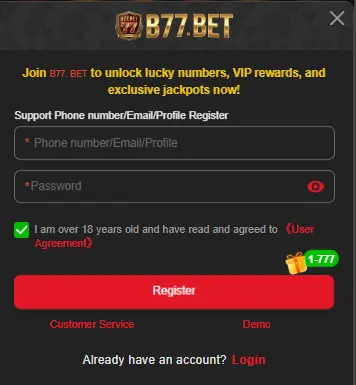
B77 Account Registration
- Launch the installed application on your mobile device.
- Select the Register or Sign Up option on the welcome screen.
- Enter the required information, such as a valid mobile number or email address.
- Choose a strong, unique password to secure your account.
- Complete any verification prompts or OTP codes if requested by the registration system.
- Submit your details to finalize your new account setup.
Login B77
- Open the application on your smartphone.
- Tap the Login button on the main entry screen.
- Enter your registered username, phone number, or email along with your password.
- Tap Confirm to access your user dashboard.
- Always keep your login credentials private and avoid saving passwords on shared or public devices.
How to deposit and withdraw on B77 Game?
For adding funds
- Open the app and log in to your account.
- Go to the Deposit or Wallet section.
- Choose a payment method from the list shown in the app.
- Type the amount you want to add.
- Follow the on-screen instructions to complete the payment.
To withdraw money
- Open the app and go to your Wallet or Account menu.
- Click on the Withdraw option.
- Enter your payment account details very carefully.
- Type the amount you want to take out.
- Submit your request and wait for the system to process it.
Account and Safety Tips
| Safety Tip | What to Do |
|---|---|
| Strong Passwords | Use a mix of letters, numbers, and symbols for your password. |
| Private Credentials | Never share your password, PIN, or OTP with anyone. |
| Avoid Suspicious Links | Do not open unknown links or pop-ups offering unofficial bonuses. |
| Check App Permissions | Review the permissions requested by the app before installation. |
| Avoid Modified APKs | Use clean and reliable APK files instead of cracked or modified versions. |
| Keep Software Updated | Keep your Android system and security software updated. |
B77 Game Pros and Cons
Possible Advantages
- Unified dashboard combining multiple game categories in one place.
- Lightweight application design optimized for standard Android smartphones.
- Straightforward installation and account registration process.
- Accessible mobile entertainment format for casual users.
Possible Limitations
- Requires manual APK downloading and security permission adjustments.
- Feature availability and game libraries can change across software versions.
- Transaction options and processing speeds may vary based on regional updates.
- Online gaming activities involve inherent performance and connection dependencies.
Common Problems and Solutions
App Not Opening
If the application closes immediately or fails to launch, try clearing the app cache in your device settings or restarting your smartphone.
Installation Problems
If your phone blocks the setup, ensure that “Install from Unknown Sources” is enabled and verify that you have enough free storage space.
Login Problems
Double-check your username and password details. If connection errors occur, verify that your mobile data or Wi-Fi connection is stable.
Slow Loading
A weak internet connection can cause lag or slow asset loading. Switch to a stronger network or close background apps to free up device memory.
Outdated APK Version
If features fail to respond correctly, visit the official source to check if a newer software version is available for download. Common Problems and Solutions
App Not Opening
If the application closes immediately or fails to launch, first try clearing the app cache in your device settings. Alternatively, restart your smartphone to see if the problem is resolved.
Installation Problems
If your phone blocks the setup, check whether the installation settings allow APK files from the source you are using. Additionally, verify that you have enough free storage space before trying again.
Login Problems
First, double-check your username and password details. Moreover, if connection errors occur, ensure that your mobile data or Wi-Fi connection is stable before attempting to log in again.
Slow Loading
A weak internet connection can cause lag or slow asset loading. Therefore, switch to a stronger network or close unnecessary background apps to free up device memory.
Outdated APK Version
If certain features fail to respond correctly, check the official source to see whether a newer software version is available. Before updating, make sure the source is legitimate and review the app’s requested permissions.
B77 Game User Experience
The overall user experience of a mobile application depends heavily on its interface layout, navigation speed, and visual presentation. The B77 Game utilizes a structured menu system designed to help users locate different gaming categories without excessive tapping.
Loading times remain generally stable on compatible Android hardware, though performance can vary depending on device specifications and internet stability. The clean visual design minimizes clutter, allowing users to move smoothly between settings, game lobbies, and profile options.
Questions Asked About the Game
B77 Game is an online gaming platform that may offer different games and features.
It may be available for compatible Android devices, depending on the current version.
Check the official source, verify the APK file, and review its permissions before installing it.
Check your internet connection, restart the app, and look for an available update.
Conclusion
The B77 Game offers an accessible mobile entertainment option for users interested in unified Android gaming platforms. By combining multiple categories into a lightweight interface, it delivers a straightforward user experience. However, users should always practice digital safety by verifying APK sources, reviewing app permissions, keeping their software updated, and understanding local guidelines before engaging with online gaming applications.